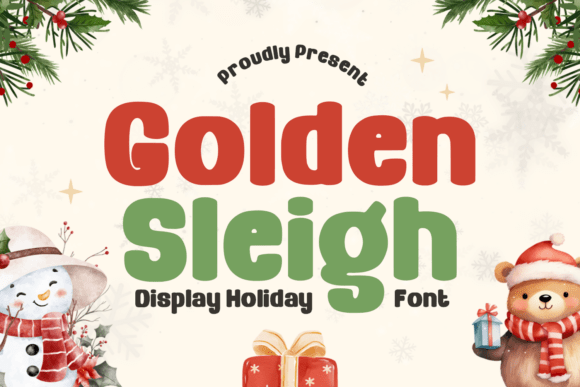
Golden Sleigh: Elevating Seasonal and Formal Design with Refined Typography
When selecting typography for holiday projects or formal events, the line between festive charm and visual clutter is often thinner than designers realize. Golden Sleigh exists to bridge that gap, offering a refined and elegant font that captures the magical spirit of the season without sacrificing professional sophistication. Inspired by classic traditions, this typeface combines graceful letterforms with a warm, timeless feel. However, owning a beautiful script is only half the battle; understanding how to implement it correctly determines whether your design looks luxurious or amateurish. For creators, marketers, and hobbyists aged 20 to 50, mastering the nuances of Golden Sleigh can transform greeting cards, wedding invitations, and seasonal branding from generic to memorable.
Understanding the Versatility Beyond Christmas
A common misconception limits Golden Sleigh strictly to December festivities. While it is perfectly suited for Christmas and winter themes, restricting its use to this narrow window overlooks significant value. The font’s elegant style brings a sense of sophistication that translates beautifully to Thanksgiving, weddings, birthdays, Easter, and year-round seasonal celebrations. When evaluating this typeface, consider it a multi-purpose asset for formal designs rather than a single-use novelty.
The harmonious flow of the characters allows for balanced typography in diverse contexts. For example, the same ligatures that add whimsy to a holiday gift tag provide necessary grace to a spring wedding invitation. By viewing Golden Sleigh as a versatile tool for elegance rather than just a "Christmas font," you maximize your return on investment and maintain brand consistency across different seasonal campaigns. This broader application prevents the need to purchase separate fonts for every minor holiday, streamlining your creative workflow.
Avoiding Legibility Pitfalls in Elegant Scripts
The most frequent error when using decorative fonts like Golden Sleigh is prioritizing aesthetics over readability. Because the characters feature intricate details and flowing connections, they require careful handling. A mistake many beginners make is setting entire paragraphs or long sentences in this style. This creates a dense texture that fatigues the reader and obscures the message. Instead, treat Golden Sleigh as an accent voice.
Better Approach: Use this font exclusively for headlines, names, dates, or short phrases. Pair it with a clean sans-serif or simple serif for body copy. This contrast not only ensures your content is accessible but also makes the decorative elements pop. If you are designing a greeting card, let Golden Sleigh handle the "Happy Holidays" or the recipient's name, while the personal message inside remains in a highly legible typeface. This hierarchy guides the viewer’s eye and maintains the polished, professional look that the font is designed to deliver.
Technical Considerations for Cricut and Embroidery
For crafters and small business owners using cutting machines or embroidery software, file format and vector integrity are non-negotiable. Golden Sleigh includes OTF, TTF, and WOFF formats, which covers most digital and print needs. However, users often overlook the specific requirements of physical production. A common issue arises when designers attempt to cut or stitch text without properly converting it to outlines or paths first. Live text can shift, disconnect, or fail to render correctly in machine software, leading to wasted materials and frustration.
Before sending any project to a Cricut, Silhouette, or embroidery machine, always convert your Golden Sleigh text to curves or outlines. This locks the beautiful ligatures and swashes into place, ensuring the machine reads the design exactly as intended. Additionally, check the stroke width. While the font is elegant, extremely thin hairlines may not translate well to certain fabrics or vinyl types. Test a small sample first to ensure the luxurious touch survives the manufacturing process. Taking these preventive steps saves time and ensures your handmade products retain their high-end appearance.
Evaluating Spacing and Kerning for Professional Results
Elegant scripts rely heavily on the connection between letters. A telltale sign of inexperienced design is poor spacing where letters either collide awkwardly or drift too far apart, breaking the natural flow. Golden Sleigh features beautifully crafted characters designed to flow harmoniously, but automatic kerning in design software is not always perfect, especially when mixing uppercase and lowercase or adding custom swashes.
Do not trust the default tracking settings blindly. Manually adjust the kerning to ensure the connecting strokes meet seamlessly. Pay special attention to capital letters followed by lowercase ones, as this transition point often requires optical correction. In branding and packaging, these micro-adjustments distinguish a premium product from a DIY attempt. If you are creating SVG designs for sale or client work, this attention to detail is what justifies a higher price point and builds trust in your craftsmanship.
Installation and File Management Best Practices
Even experienced designers sometimes rush through installation, leading to missing glyphs or activation errors later. Golden Sleigh comes with easy-to-use installations, but proper file management is still essential. Before installing, organize your font files in a dedicated folder. Ensure you are installing the correct format for your specific software; while TTF is universally compatible, OTF often provides better access to advanced typographic features like alternate characters and ligatures in programs like Adobe Illustrator or Affinity Designer.
If you plan to use the font for web projects via the WOFF format, verify your licensing agreement covers web embedding. Assuming a desktop license includes web rights is a legal and technical risk that can result in broken links or compliance issues. Always confirm the scope of your license matches your intended use case, whether that is personal crafting, commercial merchandise, or digital publishing. Proper setup at the beginning prevents disruptive workflow interruptions down the road.
Making the Right Choice for Your Project
Before downloading or purchasing, assess whether Golden Sleigh aligns with your specific communication goals. Ask yourself if the project requires warmth and tradition or modern minimalism. This font excels at evoking nostalgia, luxury, and celebration. It is less suitable for corporate reports, tech startups, or contexts requiring stark neutrality. Matching the font’s personality to the project’s tone is crucial for effective communication.
Furthermore, consider the output medium. The elegant details add character and depth that shine in large-format prints, social media graphics, and premium packaging. However, if your primary use case involves tiny text on mobile screens or low-resolution faxing, the intricate flourishes may be lost. Evaluate your typical canvas size and resolution requirements. When used appropriately, Golden Sleigh delivers a polished and professional look that elevates any design it touches. By avoiding common pitfalls regarding legibility, technical preparation, and contextual fit, you can fully leverage this typeface to bring timeless beauty to your creative endeavors.