Berry Sweet: A Practical Guide to Using This Playful Display Font Effectively
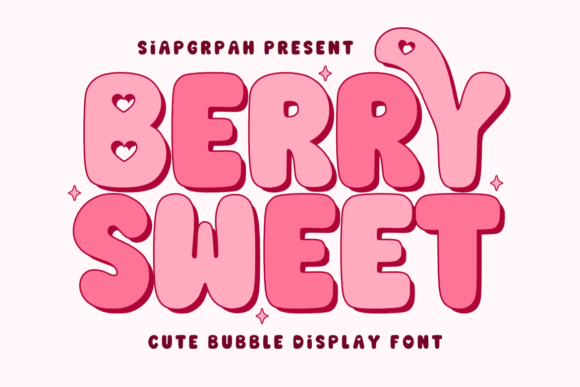
Bring your ideas to life with Berry Sweet, a charming and playful bubble display font that exudes playfulness. Its soft curves and bold appearance are perfect for creating eye-catching headlines, posters, social media graphics, and branding. However, the very characteristics that make this typeface so appealing can also lead to significant design missteps if not handled with intention. Adding a dreamy touch to your designs with this delightful font requires more than just selecting it from a dropdown menu; it demands an understanding of visual hierarchy, readability, and appropriate context.
Many creators, from small business owners to freelance designers, are drawn to Berry Sweet because it feels approachable and fun. It solves the problem of sterile, corporate aesthetics by injecting warmth and personality into a project. Yet, a common pitfall is assuming that its decorative nature makes it suitable for every element of a layout. When used without restraint or strategic pairing, even the most beautiful display font can compromise the user experience and dilute your brand message. Understanding where this typeface shines—and where it should be avoided—is the key to professional results.
The Trap of Overusing Decorative Typography
The most frequent mistake encountered with Berry Sweet is treating it as a workhorse rather than a spotlight performer. Because the letterforms are inherently expressive, using them for body copy, captions, or lengthy paragraphs creates immediate friction for the reader. The bubbly structure reduces legibility at smaller sizes and increases cognitive load when reading sentences longer than a few words.
When you use this font for extended text, you risk making your content feel amateurish or difficult to consume. Readers may bounce from a website or ignore a flyer simply because the text feels exhausting to parse. The solution is strict discipline regarding application. Reserve Berry Sweet exclusively for high-impact areas:
- Main Headlines: Use it for titles under ten words to maximize impact without sacrificing clarity.
- Call-to-Action Buttons: Short phrases like "Shop Now" or "Join Us" benefit from the friendly, inviting weight of the font.
- Logo and Wordmarks: The unique silhouette helps brands stand out in crowded markets, particularly in food, lifestyle, or children’s sectors.
- Social Media Overlays: Perfect for Instagram stories or Pinterest pins where quick visual recognition is paramount.
For everything else, pair Berry Sweet with a clean, neutral sans-serif or a highly readable serif. This contrast not only preserves the charm of the display font but also ensures your audience can actually read the important details of your message.
Navigating Licensing and Commercial Viability
A critical oversight that affects both legal safety and budget efficiency is misunderstanding licensing terms before downloading or purchasing. Many users find a free version of Berry Sweet on various repository sites and assume it covers all uses. Often, these free downloads are restricted to personal use only. Using them for client work, merchandise, or monetized content can lead to copyright issues or unexpected retroactive fees.
Before integrating this typeface into any commercial project, verify the specific license tier. Check whether the license includes webfont embedding, app usage, or merchandise limits. Some licenses cap the number of impressions or units sold. Investing in the correct commercial license upfront is far more cost-effective than redesigning a campaign later due to compliance issues. Always download from reputable foundries or authorized marketplaces to ensure you receive complete character sets and proper documentation.
Technical Considerations for Digital and Print
Berry Sweet’s bold, rounded forms behave differently across mediums, and failing to test for these variations is a common source of frustration. On digital screens, especially mobile devices, heavy display fonts can appear pixelated or bleed together if the resolution or rendering settings aren't optimized. In print, the ink spread on uncoated paper can cause the soft curves to fill in, turning distinct letters into indistinct blobs.
To avoid these quality issues, adopt a testing-first workflow. For web projects, test the font across multiple browsers and screen sizes. You may need to adjust letter-spacing (tracking) slightly looser than usual to prevent characters from touching on small displays. For print, request a physical proof or consult with your printer about ink limits. If you are printing on porous materials like kraft paper or fabric, consider increasing the font size or choosing a lighter weight variant if available to compensate for dot gain.
Another technical detail often overlooked is OpenType feature support. Berry Sweet may include alternates, ligatures, or swashes that elevate the design from generic to custom. Ignoring these features leaves value on the table. Accessing stylistic alternates allows you to avoid repetitive letter shapes in headlines, creating a more organic, hand-lettered feel that aligns with the font's playful spirit. Always check the font file in your design software’s glyph panel to discover these hidden assets.
Contextual Appropriateness and Brand Alignment
While Berry Sweet is versatile within its niche, it is not universally appropriate. A significant error is applying this aesthetic to industries or messages that require gravity, luxury, or technical precision. Using a bubbly display font for financial services, legal documents, or high-end luxury goods can create a dissonance that undermines trust. The font communicates youth, sweetness, and informality; if your brand voice is serious or exclusive, this typeface will send mixed signals.
Evaluate your project’s emotional goal before committing to this choice. Ask yourself if the playfulness enhances the message or distracts from it. For example, a pediatric dentist’s office benefits immensely from the reassuring, non-clinical vibe of Berry Sweet. Conversely, a medical research firm would likely find it detrimental to their perceived authority. When in doubt, create two mockups—one with Berry Sweet and one with a safer alternative—and gather feedback from people who represent your target demographic rather than relying solely on personal preference.
Maintaining Visual Balance in Layouts
Even when used correctly for headlines, Berry Sweet can overwhelm a composition if negative space isn't managed properly. Its bold weight demands room to breathe. Crowding it against images, borders, or other text elements creates visual tension that feels chaotic rather than charming. Beginners often fill every available pixel, but professional typography relies heavily on whitespace to guide the eye.
Treat Berry Sweet as a graphical element rather than just text. Allow generous margins around headlines set in this typeface. Ensure sufficient line height if stacking multiple words, as the vertical bulk of bubble letters requires more breathing room than standard typefaces. By respecting the spatial needs of the font, you maintain the dreamy, effortless quality that makes it so effective. Remember that the goal is to enhance communication, not just to decorate a page. When you balance enthusiasm with technical precision, Berry Sweet becomes a powerful tool for bringing creative visions to life without compromising usability or professionalism.