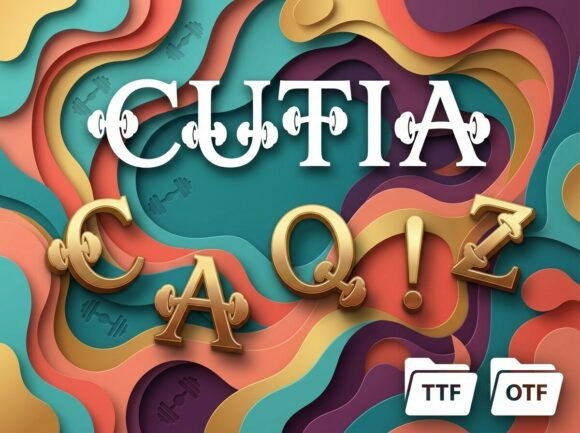
Understanding Cutia: A Comprehensive Guide to Using This All-Caps Decorative Display Font
In the vast landscape of digital typography, finding a typeface that truly speaks to the soul of a project can be a daunting task. While standard sans-serif and serif fonts serve functional purposes for body text, there are moments in design that demand something far more expressive. Enter Cutia, a stunning decorative display font designed specifically to be the center of attention. For creators, marketers, and business owners looking to break away from the ordinary, understanding the nuances of this unique typeface is essential for maximizing its potential.
This guide explores the purpose, significance, and practical application of Cutia. We will move beyond simple aesthetics to understand how this font fits into modern branding, why its specific technical constraints matter, and how to leverage its artistic personality while maintaining professional polish.
The Role of Decorative Display Fonts in Modern Design
To appreciate Cutia, one must first understand the category it inhabits. In typography, fonts are generally divided into two camps: text faces and display faces. Text faces are designed for readability at small sizes over long passages. Display fonts, conversely, are engineered for impact at large sizes. They are the visual equivalent of a shout, a whisper, or a dramatic pause in a conversation.
Cutia falls firmly into the display category. Its primary function is not to convey information efficiently, but to convey emotion and identity. In an era where digital content is consumed rapidly, the first visual impression often dictates whether a user engages with the material. A decorative display font serves as a visual hook, signaling to the audience that what follows is curated, artistic, and intentional.
Breaking Away from Minimalism
For the last decade, design trends have leaned heavily toward minimalism and utilitarianism. While clean lines have their place, there is a growing fatigue among audiences who crave texture and personality. Cutia addresses this shift by offering a strong visual personality that feels handcrafted rather than manufactured. It allows brands to differentiate themselves in saturated markets where everyone seems to be using the same geometric sans-serif typefaces.
Decoding the Visual Personality of Cutia
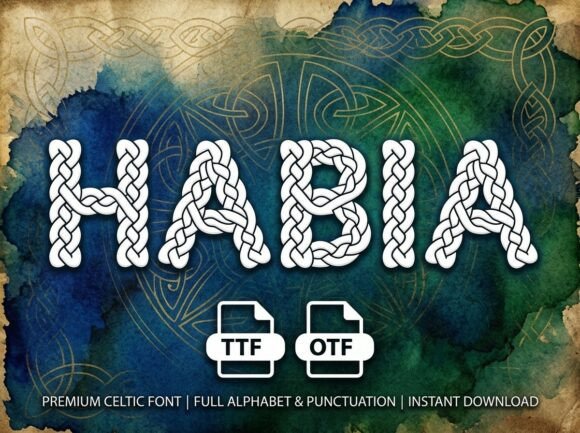
Cutia is described as having "unique artistic elements," but what does that mean practically for a designer? The font features intricate detailing that transforms standard letterforms into illustrations. Each character acts as a standalone piece of art, which is why it excels in applications like logos and packaging.
When selecting a font like Cutia, you are choosing a specific tone. It suggests luxury, creativity, heritage, or boldness depending on the context. Unlike neutral fonts that adapt to their surroundings, Cutia imposes its character onto the design. This is a powerful tool when used correctly, as it reduces the need for additional graphic elements. The type itself becomes the image.
Crucial Technical Consideration: The All-Caps Constraint
Before integrating Cutia into your workflow, there is a vital technical specification that must be understood to avoid frustration. This font is an ALL-CAPS Uppercase Only display typeface. It does not include lowercase letters.
This is not a missing feature; it is a deliberate design choice. Many beginners assume that a lack of lowercase glyphs is a defect, but in high-end display typography, it is often a hallmark of quality. Here is why this distinction matters:
- Visual Consistency: By designing only uppercase forms, the type designer can ensure that every letter shares the exact same height, weight, and decorative complexity. Lowercase letters often require simplified forms to remain legible at smaller sizes, which can dilute the ornate details that make Cutia special.
- Intended Use Case: The absence of lowercase signals clearly that this font is for headlines, logos, and decorative initials only. It prevents designers from accidentally setting body copy in a typeface that would be unreadable in paragraph form.
- Impact Optimization: Uppercase letterforms naturally occupy more vertical space and present a uniform block of texture. For high-impact headlines, this creates a solid architectural structure that commands attention.
Important Note: When typing with Cutia, always ensure your Caps Lock is active or use all-caps styling in your software. Typing in lowercase mode may result in blank spaces or fallback characters, as those glyphs simply do not exist within the font file.
Practical Applications Across Industries
Versatility is key for any paid asset. Despite its specialized nature, Cutia finds relevance across multiple sectors due to its polished finish. Here is how different professionals utilize this typeface:
Branding and Logo Design
A logo needs to be memorable. Cutia’s artistic flair makes it ideal for wordmarks where the name of the company is the primary visual identifier. Because the letters are decorative, they often eliminate the need for a separate icon or symbol. This is particularly effective for boutique hotels, artisanal food brands, fashion labels, and creative agencies.
Packaging and Label Design
On a store shelf, packaging has milliseconds to capture consumer interest. Cutia works exceptionally well for premium products where the packaging implies quality. Whether it is a wine label, a cosmetic box, or a specialty coffee bag, the font communicates craftsmanship. Its professional finish ensures that even though it is decorative, it does not look amateurish or messy.
Digital Marketing and Social Media
In social media feeds, text-heavy images often get scrolled past. Using Cutia for key phrases in Instagram stories, Pinterest pins, or YouTube thumbnails creates immediate visual contrast against standard system fonts. It stops the scroll by introducing an element of surprise and artistry into a standardized feed layout.
Technical Specifications and File Formats
When acquiring Cutia, you receive two distinct file formats. Understanding the difference ensures compatibility across various platforms and software.
- OTF (OpenType Font): This is the professional standard. OpenType files support advanced typographic features and are preferred by industry-standard software like Adobe Illustrator, InDesign, and Photoshop. If you are doing complex layout work or need access to potential ligatures or alternates (if included), OTF is your primary choice.
- TTF (TrueType Font): This format offers universal compatibility. It is ideal for users working in Microsoft Office, Canva, Cricut, Silhouette, or older design software. TTF ensures that the font renders correctly across different operating systems without requiring advanced OpenType support.
Having both formats guarantees that your brand identity remains consistent whether you are designing a billboard in professional software or creating a quick internal presentation in Word.
Best Practices for Pairing and Layout
Because Cutia is so visually dominant, it requires careful pairing. A common mistake is trying to match it with another decorative font. This creates visual noise and confusion.
The Golden Rule of Pairing: Let Cutia be the star. Pair it with simple, clean sans-serif or minimalist serif fonts for subheadings and body text. The contrast between the ornate headline and the clean supporting text enhances the beauty of both. Think of Cutia as jewelry; it shines brightest against a plain background.
Additionally, pay close attention to tracking (letter spacing). Decorative display fonts often have tight kerning by default to maintain flow. However, in all-caps settings, slightly increasing the tracking can improve legibility and add a sense of luxury. Conversely, tightening the spacing can create a dense, poster-like texture. Experimentation here is key to finding the right mood for your specific project.
Conclusion: Elevating Design Through Intentional Typography
Cutia represents more than just a collection of letterforms; it represents a commitment to distinctive visual communication. In a world of generic templates and safe choices, utilizing a specialized display font is an act of creative bravery. By understanding its all-caps nature, respecting its decorative intent, and applying it with strategic restraint, designers can transform ordinary projects into extraordinary experiences.
Whether you are rebranding a business, launching a product, or simply seeking to elevate your personal creative work, Cutia offers the tools to make a lasting impression. Remember that typography is not just about reading; it is about feeling. With Cutia, every headline becomes a statement, and every logo becomes a signature.