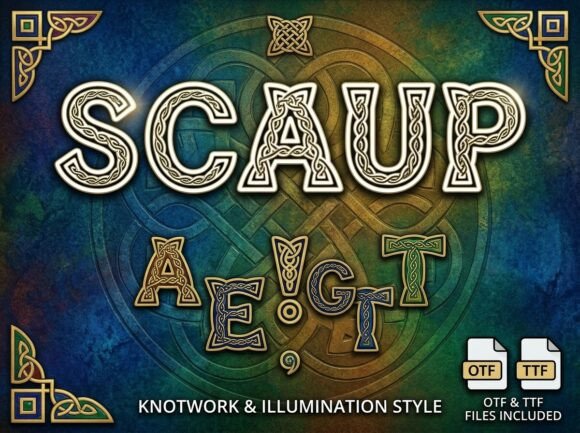
Scaup: Mastering High-Impact Decorative Typography
In the vast landscape of digital design, typography serves as the primary voice of visual communication. While body text prioritizes readability and neutrality, display fonts carry the heavy lifting of emotion, branding, and immediate recognition. Among these specialized tools, Scaup has emerged as a distinctive choice for designers seeking to break away from conventional aesthetics. This font is a stunning decorative display typeface designed specifically to be the center of attention, offering a unique artistic personality that transforms standard text into a visual experience.
Understanding the specific role and technical nature of Scaup is essential for any creator considering it for their next project. It is not merely another font installation; it is a deliberate stylistic commitment. By exploring its characteristics, optimal use cases, and technical specifications, designers can leverage this typeface to create bold headlines, artistic logos, and creative packaging while maintaining a professional finish.
The Visual Identity and Artistic Purpose
Scaup distinguishes itself through a strong visual personality that rejects minimalism in favor of expressive form. In an era where clean sans-serifs often dominate web and print design, decorative fonts like Scaup provide a necessary counterpoint. They offer texture and character that standard typefaces simply cannot achieve. The design philosophy behind this typeface centers on the idea that every letter should function as an individual work of art rather than just a vessel for information.
This artistic approach makes Scaup particularly valuable for projects requiring instant emotional engagement. When a viewer encounters a headline set in this typeface, they are not just reading words; they are absorbing a mood. The unique artistic elements embedded in the letterforms convey creativity and confidence. For brands attempting to position themselves as innovative, artisanal, or premium, this typographic choice signals a departure from the ordinary and suggests a higher level of craftsmanship.
Defining the All-Caps Constraint
Before integrating Scaup into a design workflow, it is critical to address its most defining functional characteristic. This font is an ALL-CAPS Uppercase Only display typeface. It does not include lowercase letters. This is not a limitation of the file but a deliberate design decision intended to maximize visual impact.
Uppercase-only fonts possess a uniform vertical rhythm that creates a solid, block-like texture. This consistency allows for tighter tracking and more geometric alignment, which is ideal for logos and poster titles. However, it also dictates how the font must be used. Designers should never attempt to simulate lowercase letters by reducing the point size of capital characters, as this disrupts the intended weight and proportion. Instead, embrace the all-caps nature as a feature that demands hierarchy through spacing, color, and layout rather than case variation.
Practical Applications and Use Cases
Versatility within the realm of display typography means knowing exactly where a font shines. Scaup is engineered for specific high-visibility environments where legibility at small sizes is secondary to aesthetic impact at large scales.
- Bold Headlines and Editorial Design: Magazine covers, blog post titles, and hero sections on websites benefit immensely from Scaup’s commanding presence. It anchors the page and guides the viewer’s eye immediately to the core message.
- Artistic Logos and Wordmarks: Because each glyph carries unique artistic elements, Scaup reduces the need for extensive custom lettering modifications. It provides a ready-made foundation for brand identities that require a bespoke feel without the cost of custom type design.
- Creative Packaging and Labeling: On physical products, typography must compete with colors, textures, and shelf neighbors. Scaup’s decorative nature ensures that product names and taglines stand out in retail environments, conveying quality and distinctiveness.
- Event Branding and Merchandise: From concert posters to limited-edition t-shirts, this typeface translates well to merchandise where the text itself is the primary graphic element.
Evaluating Suitability for Your Project
While Scaup offers significant creative advantages, it is not a universal solution. Determining whether it fits your specific needs requires an honest assessment of your project’s goals. Ask yourself if the primary objective is atmospheric impact or informational density. If you are designing a financial report, a user manual, or a data-heavy dashboard, this decorative display font is likely inappropriate. However, if the goal is to evoke curiosity, establish a luxury tone, or celebrate a creative milestone, Scaup becomes a powerful asset.
Consider also the surrounding typography. Because Scaup has such a strong personality, it requires a supportive cast of neutral typefaces. Pairing it with another decorative font often leads to visual chaos. Instead, combine it with clean, highly readable sans-serif or serif body text. This contrast ensures that the decorative elements of Scaup remain the focal point without compromising the overall usability of the design.
Technical Specifications and File Formats
Professional design work requires reliable assets. When acquiring Scaup, users receive two industry-standard file formats, ensuring compatibility across virtually all modern platforms and software.
- OTF (OpenType Font): This is the professional standard for advanced design and layout software such as Adobe Illustrator, InDesign, and Affinity Designer. OpenType files support advanced typographic features and are generally preferred for print production and high-resolution vector work due to their superior outline quality and cross-platform consistency.
- TTF (TrueType Font): The TrueType format serves as the standard file for universal compatibility. It is widely supported across older systems, basic office software, and various web environments. Having the TTF version ensures that you can access the font even when working outside of professional design ecosystems or when sharing files with clients who may not have specialized software.
Both formats ensure that the intricate details of Scaup’s decorative elements render crisply, whether scaled up for a billboard or sized down for a business card header. Maintaining both files in your asset library future-proofs your projects against software updates and platform changes.
Navigating Limitations and Best Practices
To get the most out of Scaup, designers must respect its boundaries. The absence of lowercase letters is the most significant operational constraint. This means that long sentences set in this typeface will be difficult to read and visually exhausting. Reserve Scaup strictly for short bursts of text: titles, names, slogans, and initials.
Additionally, pay close attention to kerning and tracking. Decorative fonts often have unique glyph widths that can create awkward negative space between certain letter combinations. While the font is professionally finished, manual optical adjustments are often necessary to achieve perfect harmony in logos and headlines. Do not rely solely on default metrics; use your eye to balance the artistic flourishes against the structural integrity of the word shape.
Finally, consider accessibility. High-contrast decorative fonts can sometimes pose challenges for screen readers or users with visual impairments if not implemented correctly in digital environments. Always ensure that when using Scaup on the web, you provide appropriate alt text or semantic HTML tags so that the visual style does not obscure the underlying content for assistive technologies.
Making the Final Decision
Choosing a typeface is an exercise in balancing expression with function. Scaup represents a specific niche in the typographic spectrum: the intersection of professional polish and unapologetic artistic flair. It is designed for creators who understand that typography is not just about arranging letters, but about curating an experience.
For business owners and professionals, investing in this typeface signals a willingness to prioritize brand distinction over safe conformity. For designers, it offers a reliable tool for solving visual problems that require weight and character. By understanding its all-caps nature, respecting its decorative purpose, and utilizing the provided OTF and TTF files correctly, you can harness the full potential of Scaup to create work that is not only seen but remembered.
Ultimately, the value of Scaup lies in its ability to transform the mundane into the memorable. In a crowded visual marketplace, having a typeface that serves as a genuine center of attention is not just a stylistic preference—it is a strategic advantage. Whether you are launching a new product, rebranding a service, or creating editorial content, this font provides the artistic vocabulary needed to speak loudly and clearly.